Showing posts with label Apk Communication. Show all posts

Wednesday, November 21, 2012

Chrome 18.0.1026320

,
Chrome 18.0.1026320
Chrome v18.0.1026320 Apk - The speed and simplicity of Chrome, now on your Android phone and tablet.
Search and browse fast with Chrome on your Android phone and tablet. Sign in to sync your personalized Chrome experience from your computer to bring it with you anywhere you go.
Search fast
- Search and navigate fast, directly from the same box. Choose from results that appear as you type.
-  Browse faster with accelerated page loading, scrolling and zooming.
Simple, intuitive experience
- Open and quickly switch between an unlimited number of tabs. On your phone, flip through tabs the way you would fan a deck of cards. On your tablet, swipe from edge to edge to switch tabs.
Sign in
- Sign in to Chrome to sync your open tabs, bookmarks, and omnibox data from your computer to your phone or tablet.  Pick up right where you left off.
- Send pages from Chrome on your computer to Chrome on your phone or tablet with one click and read them on the go, even when you’re offline.
Privacy
- Browse privately in Incognito mode.


REQUIRES ANDROID : Varies with device
Screenshot Apps :


HostHostname / AvailableDownload
Android Market staus Available (Y)
Mediafire staus Available (N)
Zippyshare staus Available (Y)
Other staus Available (N)
Read more →

Friday, November 2, 2012

Remote Desktop Client 3.7.0

,
Remote Desktop Client v3.7.0 Apk - No lugging your laptop around anymore. Connect remotely from an Android device.

*** Now with Windows 8 Multi-Touch Remoting Support ***

Xtralogic Remote Desktop Client for Android enables you to connect to your Windows computers across the Internet from a mobile device powered by Google Android platform. Once connected, it gives you mouse and keyboard control over your computer while showing you everything that's happening on the screen. You can leave your computer without losing access to your files, applications, and e-mail. Xtralogic Remote Desktop Client is using Microsoft Remote Desktop Protocol (RDP). All the necessary server components are already part of most versions of the Windows operating system (except Home varieties).

Features
* Support for Windows 8 Multi-Touch remoting (a.k.a. Metro)
* Simple Connect (eliminates the need for configuring port forwarding on a network router)
* Custom screen resolutions, including an option to automatically fit to the device screen
* Secure network communication protected by SSL/TLS
* Network Level Authentication (NLA) with CredSSP
* Microsoft Remote Desktop Gateway(RD Gateway) support
* RemoteApp programs support
* On-screen keyboard for keys missing on the device (functional keys, etc.)
* Server address book
* Master password to secure server password storage
* Audio redirection to the client from a remote computer
* Microphone redirection from the client to a remote computer
* File transfer between SD card and remote computer
* Copy/paste text between client and server
* Display zoom in/zoom out
* Pinch-to-zoom
* The first and only mobile Remote Desktop client with support for Microsoft Remote Assistance
* RDP data compression and caching to save bandwidth
* Android home screen shortcuts
* Support for x86 based Android devices
* Automatic activation of a software keyboard in text fields
* Support for international keyboard layouts
* Support for multitasking: switch to other apps without disconnecting
* Support for a physical keyboard (a keyboard connected over Bluetooth or USB)
* Physical mouse support: drag and drop with a single mouse click, mouse wheel, all three mouse buttons are supported (some features require Ice Cream Sandwich)
* Export/import the server address book and app settings to/from SD card
* Support for importing server settings from .rdp and XML files
* Multi-touch gestures for scrolling, mouse buttons emulation

Remote Desktop Client 3.7.0
$14.95

The following operating system have Remote Desktop Services and can be connected using Xtralogic Remote Desktop Client without any additional server side software:

* Windows Server 2000
* Windows XP Professional
* Windows XP Media Center Edition
* Windows Server 2003
* Windows Vista Business, Ultimate and Enterprise
* Windows Server 2008
* Windows 7 Professional, Ultimate and Enterprise
* Windows Server 2008R2

The following operating system do not have Remote Desktop Services out of the box:

* Windows XP Home
* Windows Vista Home
* Windows Vista Home Premium
* Windows 7 Starter
* Windows 7 Home Premium
* Mac OS
* Linux
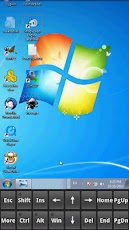
Remote Desktop Client 3.7.0

REQUIRES ANDROID:Varies with device

Download Apk :

Market :
https://play.google.com/store/apps/details?id=com.xtralogic.android.rdpclient
Read more →

Tuesday, October 23, 2012

FolderSync 2.2.4

,
FolderSync v2.2.4 Apk - FolderSync enables easy sync of files between cloud storage and Android devices.

FolderSync is a application that enables simple sync to cloud based storage to and from local folders on the device memory card. It currently support multiple SkyDrive, Dropbox, SugarSync, Ubuntu One, Box.net, LiveDrive, HiDrive, Google Docs, NetDocuments, Amazon S3, FTP, FTPS, SFTP, WebDAV or windows share (Samba/CIFS) accounts, and support for more platforms are planned. Read-only access to protected file-system also supported - requires root.

Effortlessly sync your files. Backup your music, pictures and other important files from the phone to your cloud storage or the other way around. It has never been easier. Tasker / locale support enables fine grained control of your syncs.

FolderSync also contains a full file manager, that enables you to manage your files locally and in the cloud. Copy, move and delete your files in your cloud/remote accounts. Support for creation/deletion of buckets in Amazon S3. Upload and download files from the phone. It's all supported.

IMPORTANT: 
If you cannot create account in landscape on tablet, go here for info on how to resolve this: 

You could also try out the lite version, so you can test functionality before you buy. The lite version only allows two accounts and has no sync filters or Tasker support.

FolderSync 2.2.4
$2.17

Follow news here:

The full change log can be found here:

Get support:

Please read the FAQ. I have addressed most comments there:

Detailed description:

You can choose any folder on the memory card to sync. Currently one-way and two-way sync are supported. Sync intervals and other sync settings can be specified for each sync item you configure. You set up a folderpair to sync and it will automatically keep your files in sync.

Current supported providers:
☆ Amazon S3 Simple Storage Service
☆ Dropbox
☆ SugarSync
☆ NetDocuments
☆ Google Docs/Google Drive
☆ Box.net (WebDAVs)
☆ LiveDrive (WebDAV/FTP)
☆ HiDrive (WebDAV/FTP)
☆ FTP
☆ FTPS (SSL/TLS implicit)
☆ FTPES (SSL/TLS explicit)
☆ SFTP (SSH File Transfer)
☆ Samba/CIFS/Windows Share
☆ Ubuntu One
☆ WebDAV
☆ WebDAVs (HTTPS)

Current features:
☆ Instant (full version)
☆ Multiple accounts (full version)
☆ File manager - manage your cloud files
☆ Amazon S3 Client Side Encryption support
☆ Tasker/locale support (full version)
☆ User defined sync filters (full version)
☆ Sync to and from you selected provider
☆ Two-way sync with support for deletions
☆ Backup/restore settings
☆ User specified sync interval or specific sync times
☆ Choose connection types for each sync item
☆ Support for syncing of subfolders
☆ Sync of hidden files can be disabled
☆ No ads (full version)


Deletion in two-way sync: 
To enable deletions in two-way sync, the option “Do not sync deletions” must be unchecked

FTPS/FTPES servers without resume support:
Use these at your own risk, as uploads may become corrupt.


REQUIRES ANDROID:2.1 and up

Download Apk :

Market :
https://play.google.com/store/apps/details?id=dk.tacit.android.foldersync.full
Read more →